Task: Install ansible version 4.8.0 on Jump host using pip3 only. Make sure Ansible binary is available globally on this system, i.e all users on this system are able to run Ansible commands.
Check the OS version
cat /etc/os-release
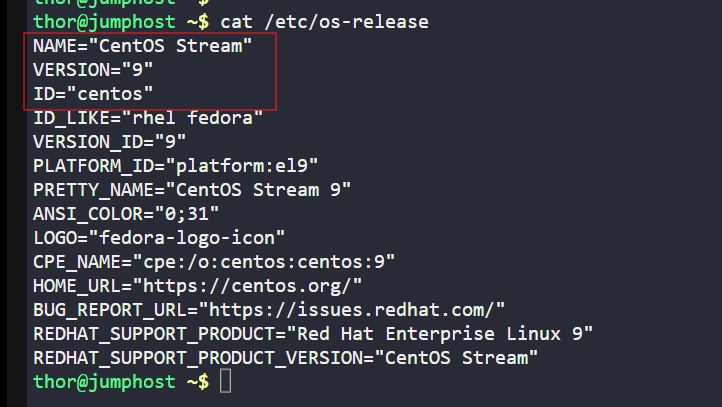
As, it is CentOS, we will use rpm package else for Debian, use apt package.
Check if Python & PP is installed or not. If not install it.
Ansible runs on Python, so the first step is to make sure Python 3 is available.
pip3is Python’s package manager — without it, we can’t install Ansible.# For Debian/Ubuntu
sudo apt update && sudo apt install -y python3-pip# For Debian/Ubuntu# For RHEL/CentOS/Rocky Linux
sudo yum install -y python3-pip# For RHEL/CentOS/Rocky Linuxsudo pip3 install --upgrade pip
Once Python & PIP is installed, use the below commands to confirm.
python3 --version or python -V
pip3 --version or pip -V

Install Ansible version 4.8.0 or any required version
sudo pip3 install ansible==4.8.0

To verify
pip3 show ansible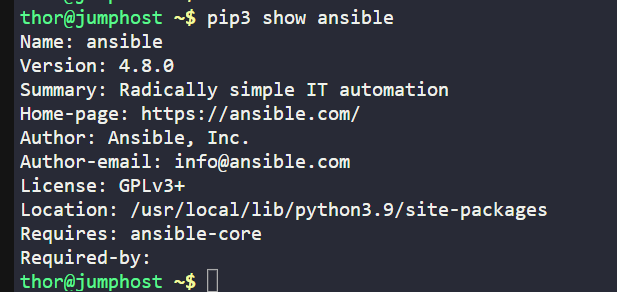
ansible --version
which ansible
The ansible --version command should output information including ansible-core and the full Ansible package version. The which ansible command should return a path like /usr/local/bin/ansible, confirming its global installation location. If the ansible command is not found, ensure that /usr/local/bin is in the system's PATH environment variable. This is usually the default for most Linux distributions.